Agilent 82357a Usb Gpib Driver
System:
CentOS 6.5 32-bit
CentOS 6.5 64-bit
kernel:2.6.32-358.23.2
SHELL: tcsh
1) download linux gpib tarball (the URL points to 3.2.20)
As of today (03.19.2014) the latest version is 3.2.20.
wget http://goo.gl/992QnE
tar xvfz linux-gpib-3.2.20.tar.gz
cd linux-gpib-3.2.20
./configure
make
su
make install
2) download firmware
wget http://goo.gl/1BQz90
tar xvfz gpib_firmware-2008-08-10.tar.gz
3) download fxload
32-bit
wget http://goo.gl/kV8KH7
64-bit
wget http://goo.gl/DoH5aA
su -
rpm -ivv fxload-2008_10_13-3.el6.x86_64.rpm
OR
rpm -ivv fxload-2008_10_13-3.el6.i686.rpm
4) edit file /etc/gpib.conf
su -
vim /etc/gpib.conf
change
board_type = '???ni_pci???' /* type of interface board being used */
to
board_type = 'agilent_82357a' /* type of interface board being used */
save file
5) insert Agilent 82357A into USB port
6) list USB devices
lsusb
Bus 001 Device 027: ID 0957:0007 Agilent Technologies, Inc. 82357A GPIB Interface
RED LED on the dongle is ON
7)
dmesg
usb 1-7: new high speed USB device number 27 using ehci_hcd
usb 1-7: New USB device found, idVendor=0957, idProduct=0007
usb 1-7: New USB device strings: Mfr=0, Product=0, SerialNumber=0
usb 1-7: configuration #1 chosen from 1 choice
8) insert modules into kernel
su -
insmod /lib/modules/2.6.32-358.23.2.el6.i686/gpib/sys/gpib_common.ko
insmod /lib/modules/2.6.32-358.23.2.el6.i686/gpib/agilent_82357a/agilent_82357a.ko
9)
dmesg
Linux-GPIB 3.2.20 Driver
agilent_82357a_gpib driver loading
usbcore: registered new interface driver agilent_82357a_gpib
gpib: registered agilent_82357a interface
10)
lsmod
Module Size Used by
agilent_82357a 16562 0
gpib_common 27180 1 agilent_82357a
11) cd to firmware directory
cd gpib_firmware-2008-08-10/agilent_82357a
12) read README file
cat README
13) list USB devices
lsusb
Bus 001 Device 028: ID 0957:0007 Agilent Technologies, Inc. 82357A GPIB Interface
14) load firmware into the dongle 1st time (you are still root)
fxload -t fx -D /dev/bus/usb/001/028 -I 82357a_fw.hex
nothing happens
15)
dmesg
usb 1-7: USB disconnect, device number 28
usb 1-7: new high speed USB device number 29 using ehci_hcd
usb 1-7: New USB device found, idVendor=0957, idProduct=0007
usb 1-7: New USB device strings: Mfr=0, Product=0, SerialNumber=0
usb 1-7: configuration #1 chosen from 1 choice
16) list USB devices
lsusb
Bus 001 Device 029: ID 0957:0007 Agilent Technologies, Inc. 82357A GPIB Interface
17) load firmware into the dongle 2nd time (you are still root)
fxload -t fx -D /dev/bus/usb/001/029 -I 82357a_fw.hex
ALL three LEDs are ON (two GREENone RED)
18)
dmesg
usb 1-7: USB disconnect, device number 29
usb 1-7: new high speed USB device number 30 using ehci_hcd
usb 1-7: New USB device found, idVendor=0957, idProduct=0107
usb 1-7: New USB device strings: Mfr=1, Product=2, SerialNumber=5
usb 1-7: Product: 82357A ()
usb 1-7: Manufacturer: Agilent Technologies, Inc.
usb 1-7: SerialNumber: MY49480439
usb 1-7: configuration #1 chosen from 1 choice
probe succeeded for path: usb-0000:00:1d.7-7
19) list USB devices
lsusb
Bus 001 Device 030: ID 0957:0107 Agilent Technologies, Inc.
20) change permissions on /dev/gpib0
chmod 666 /dev/gpib0
21) initialize HP 82357A USB GPIB dongle
/usr/local/sbin/gpib_config
only ONE GREEN LED is ON
22)
dmesg
attached to bus interface 0, address 0xf3bb8a00
agilent_82357a_attach: attached
23) exit from root
24) run ibtest
ibtest
Your Agilent 82357A USB GPIB dongle should be, by now, operational
Registration is quick, simple and absolutely free. Search this Thread Advanced Search. Keysight supports up to four A’s in a system. Can software written from other vendors specific to their devices that utilize NI Note that registered members see fewer ads, and ContentLink is completely disabled once you log in. Legal Privacy Terms Trademark Acknowledgements.
| Uploader: | Gasar |
| Date Added: | 26 August 2018 |
| File Size: | 6.69 Mb |
| Operating Systems: | Windows NT/2000/XP/2003/2003/7/8/10 MacOS 10/X |
| Downloads: | 2560 |
| Price: | Free* [*Free Regsitration Required] |
All times are GMT My A isn’t working correctly, where can I find more information? RS performance is slower than USB. This book contains many real life examples derived from the author’s experience as a Linux system 82357a usb gpib network administrator, trainer and consultant.

The Agilent 82357B USB/GPIB interface provides instant connections, enabling a direct connection from the USB port on your PC to GPIB instruments. USB (Universal Serial Bus) is built into most of today's desktop and laptop computers, offering fast and easy plug-and-play connection and auto configuration. IVI is a new driver standard. Agilent GPIB-USB-HS Interface Adapter controller IEEE 488 New. Or Best Offer. 1PCS Agilent 82357A USB GPIB Interface Adapter In Good Condition Used. Or Best Offer. New Agilent 82357B USB/GPIB Interface High-Speed USB 2.0 With CD driver software.
Keysight (Agilent/HP) 82357A USB/GPIB Interface
There are several approaches to control instruments via the GPIB interface If you need to reset your password, click here. Having a problem logging in? Yes, you can connect the A USB 1.
Search this Thread Advanced Search. Most Keysight products have PDF manuals that can be found on product pages. Click Here to receive this Complete Guide absolutely free.

Agilent Usb Gpib
The major enhancement that has been added to version Join our community today! Note that registered members see fewer ads, and ContentLink is completely disabled once you log in.
Having a problem installing a new program? New USB device strings: USB disconnect, device number 28 usb Problem descriptions and a free 82357a usb gpib file are available. Keysight supports up to four A’s in a system.
You are currently viewing LQ as a guest. Post your question in this forum.
Agilent 82357a USB GPIB Interface Adapter
Where can I find manuals for discontinued and obsolete Hewlett-Packard, Agilent and Keysight test equipment? How to speed up gvim by factor of 3 and remain sane.
Does the A support USB hubs? Obsolete View Service Options.
A USB/GPIB Interface [Obsolete] Keysight (formerly Agilent’s Electronic Measurement)
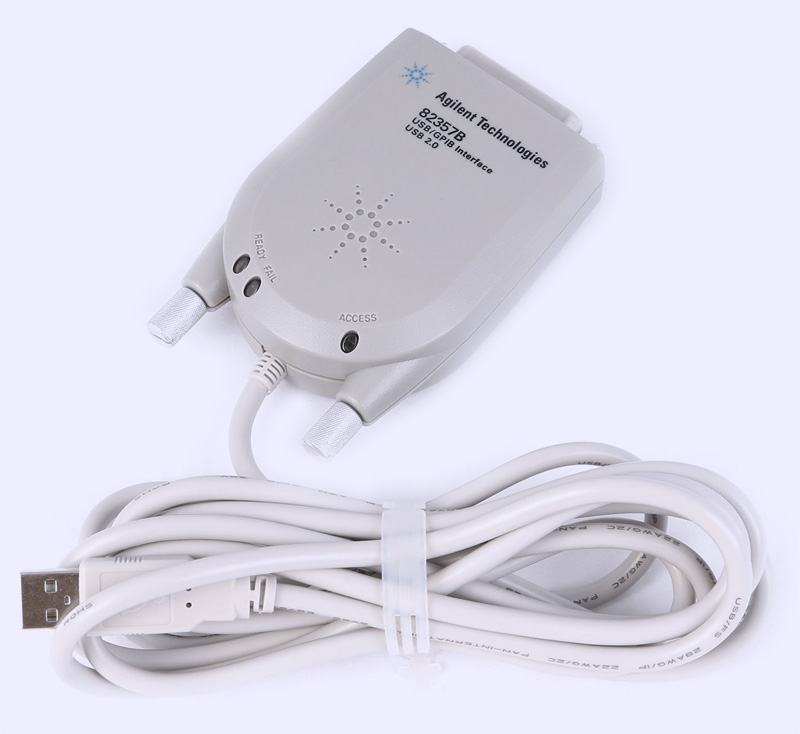
Other vendors also supply old manuals. Are you new to LinuxQuestions. Legal Privacy Terms 82357a usb gpib Acknowledgements. We have tested with the Belkin F5U This chapter can be used to help identify different hardware and software issues. By joining our community you will have the ability to post topics, receive our newsletter, use the advanced search, subscribe to threads and access many other special features. No, the A USB cable is attached to the converter for a more robust connection.
The A User’s Guide includes a troubleshooting chapter. This is equivalent to four separate 82357a usb gpib buses.
Used Keysight (Agilent/HP) A USB/GPIB Interface
BB code is On. Welcome to the most active Linux Forum on the web. My A isn’t working correctly with my laptop PC, where can I find more information?